Smart Contracts

There are several tools available to develop and test contracts. One of the simplest tools is provided on the official Ethereum site itself. The tool is called Remix, we will use this for our contract development.

Remix for Contract Development

Open the Remix IDE by typing in the following URL in your browser.https://remix.ethereum.org

The following screen will appear.
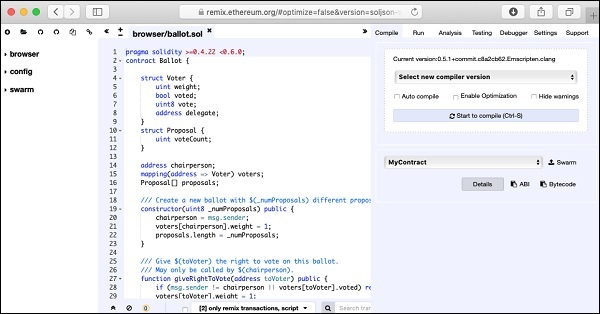
Contract Development

In the center window, you will see some default code, which is a sample Solidity code. You will type your contract code in this code editor. Your code may be auto-compiled. Upon successful compilation of the code, you will be able to run the code in the same IDE. When you execute the contract methods, the results will be displayed in the same IDE window. There are facilities to debug the code and to unit test your project. These can be seen in the menu bar at the top right hand side as shown in the IDE screenshot below. You will be using these options shortly.
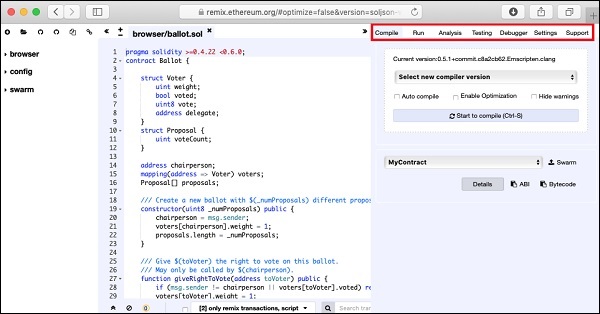
Remix options

You will now start writing your contract.

Similar Posts

  • Summary

    You learned how to write your own digital contract in Solidity. You developed and tested the contract interface in the Remix IDE. For further multi-user testing, you deployed this contract on Ganache Blockchain. On Ganache, you created two user accounts. The first account was used for publishing the contract. The second account was used for…

  • Creating Wallet

    In this chapter, we will learn how to create Ethereum wallet. To create a new wallet, enter a password of your choice and then click on the “Create New Wallet” button. When you do so, a Wallet would be created. A digital wallet is essentially the generation of a public/private key pair that you need…

  • Creating Contract Users

    In this chapter, we will learn the creation of contract users on Ethereum. To create a user for our published contract, we will create another MyEtherWallet client attached to the same Ganache Blockchain that you have been using in the previous steps. Go to the MyEtherWallet screen and create a new wallet. Click on the contracts menu and select the “Interact with…

  • Ganache for Blockchain

    Ganache is used for setting up a personal Ethereum Blockchain for testing your Solidity contracts. It provides more features when compared to Remix. You will learn about the features when you work out with Ganache. Before you begin using Ganache, you must first download and install the Blockchain on your local machine. Downloading Ganache You…