Smart Contracts

There are several tools available to develop and test contracts. One of the simplest tools is provided on the official Ethereum site itself. The tool is called Remix, we will use this for our contract development.

Remix for Contract Development

Open the Remix IDE by typing in the following URL in your browser.https://remix.ethereum.org

The following screen will appear.
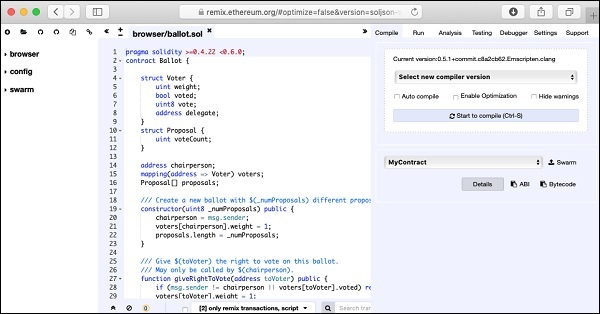
Contract Development

In the center window, you will see some default code, which is a sample Solidity code. You will type your contract code in this code editor. Your code may be auto-compiled. Upon successful compilation of the code, you will be able to run the code in the same IDE. When you execute the contract methods, the results will be displayed in the same IDE window. There are facilities to debug the code and to unit test your project. These can be seen in the menu bar at the top right hand side as shown in the IDE screenshot below. You will be using these options shortly.
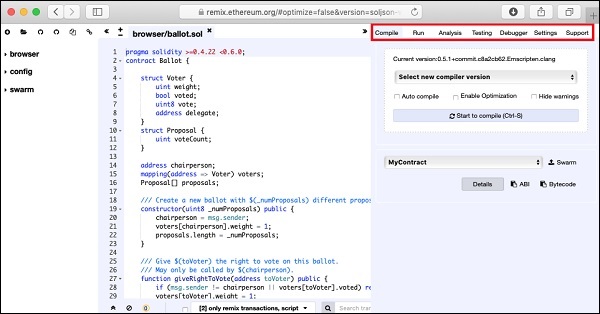
Remix options

You will now start writing your contract.

Similar Posts

  • Solidity for Contract Writing

    Solidity is an object-oriented language especially developed for contract writing. It is a high-level language, which inherits traits from C++, Python, and JavaScript. The Solidity compiler compiles your source code into bytecode that runs on Ethereum Virtual Machine (EVM). For quick understanding of the Solidity syntax, look at the sample code in the IDE.pragma solidity…

  • Introduction

    A huge success of Bitcoin raised interest in the minds of several to create their own currencies. Looking at the advantages offered by Bitcoin – a digital currency, people wanted to use the concept of Blockchain in their own applications. People wanted to move out of their physical contracts to smart digital contracts where several…

  • A Quick Walkthrough

    We will now briefly understand what is available on the Ganache desktop. On the Desktop, at the top we have several menu options out of which a few are of immediate relevance to us. The menu bar is highlighted in the screenshot below − Clicking on the TRANSACTIONS menu shows all the transactions performed so far. You…

  • Ganache for Blockchain

    Ganache is used for setting up a personal Ethereum Blockchain for testing your Solidity contracts. It provides more features when compared to Remix. You will learn about the features when you work out with Ganache. Before you begin using Ganache, you must first download and install the Blockchain on your local machine. Downloading Ganache You…

  • Creating Wallet

    In this chapter, we will learn how to create Ethereum wallet. To create a new wallet, enter a password of your choice and then click on the “Create New Wallet” button. When you do so, a Wallet would be created. A digital wallet is essentially the generation of a public/private key pair that you need…

  • Summary

    You learned how to write your own digital contract in Solidity. You developed and tested the contract interface in the Remix IDE. For further multi-user testing, you deployed this contract on Ganache Blockchain. On Ganache, you created two user accounts. The first account was used for publishing the contract. The second account was used for…