Deploying the Contract

In this chapter, we will learn how to deploy contract on Ethereum. Click on the Run menu option to deploy the contract. The following screen will appear.
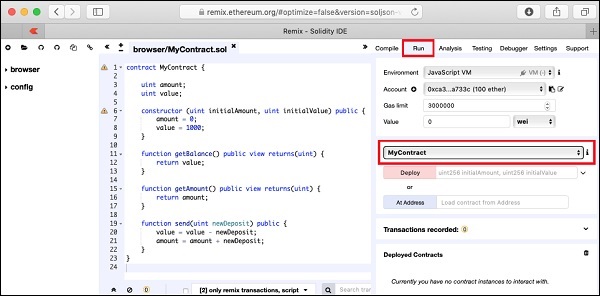
Deploy Contract

The contract name is shown in the highlighted list box. Below this, you will notice the Deploy button, click on it to deploy the contract. The contract will be deployed on the Remix built-in Blockchain. You will be able to see the deployed contract at the bottom of the screen. You can see this in the highlighted portion of the screenshot below.
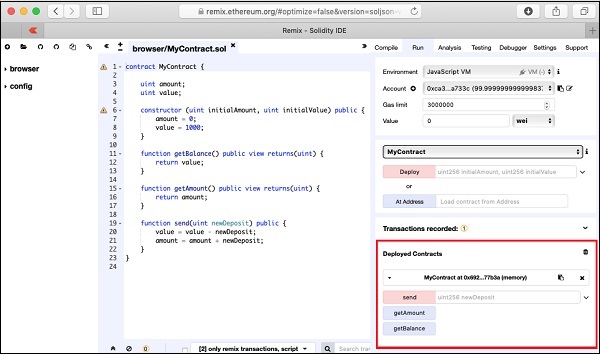
Deploy Highlighted Portion

Notice, the presence of three method names in this highlighted region. Next, you will interact with the contract by executing the contract methods.

Similar Posts

  • Introduction

    A huge success of Bitcoin raised interest in the minds of several to create their own currencies. Looking at the advantages offered by Bitcoin – a digital currency, people wanted to use the concept of Blockchain in their own applications. People wanted to move out of their physical contracts to smart digital contracts where several…

  • Compiling the Contract

    Once you write the complete contract code, compiling it in this IDE is trivial. Simply click on the Autocompile checkbox in the IDE as shown in the screenshot below − Alternatively, you may compile the contract by clicking the button with the title “Start to compile”. If there is any typo, fix it in the code window. Make…

  • Summary

    You learned how to write your own digital contract in Solidity. You developed and tested the contract interface in the Remix IDE. For further multi-user testing, you deployed this contract on Ganache Blockchain. On Ganache, you created two user accounts. The first account was used for publishing the contract. The second account was used for…