Deploying the Contract

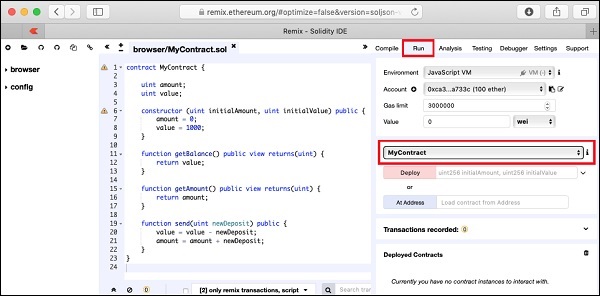
In this chapter, we will learn how to deploy contract on Ethereum. Click on the Run menu option to deploy the contract. The following screen will appear.
Deploy Contract

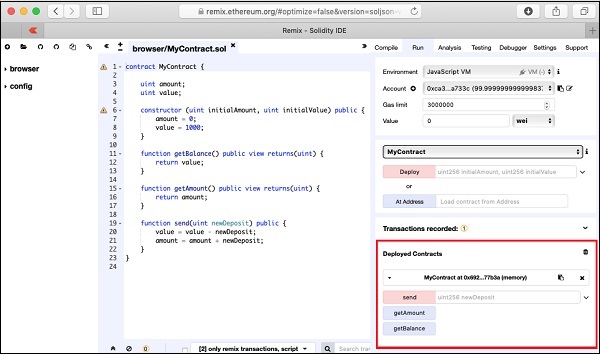
The contract name is shown in the highlighted list box. Below this, you will notice the Deploy button, click on it to deploy the contract. The contract will be deployed on the Remix built-in Blockchain. You will be able to see the deployed contract at the bottom of the screen. You can see this in the highlighted portion of the screenshot below.
Deploy Highlighted Portion

Notice, the presence of three method names in this highlighted region. Next, you will interact with the contract by executing the contract methods.

Similar Posts

  • Summary

    You learned how to write your own digital contract in Solidity. You developed and tested the contract interface in the Remix IDE. For further multi-user testing, you deployed this contract on Ganache Blockchain. On Ganache, you created two user accounts. The first account was used for publishing the contract. The second account was used for…

  • Solidity for Contract Writing

    Solidity is an object-oriented language especially developed for contract writing. It is a high-level language, which inherits traits from C++, Python, and JavaScript. The Solidity compiler compiles your source code into bytecode that runs on Ethereum Virtual Machine (EVM). For quick understanding of the Solidity syntax, look at the sample code in the IDE.pragma solidity…

  • Smart Contracts

    There are several tools available to develop and test contracts. One of the simplest tools is provided on the official Ethereum site itself. The tool is called Remix, we will use this for our contract development. Remix for Contract Development Open the Remix IDE by typing in the following URL in your browser.https://remix.ethereum.org The following screen…

  • Deploying Contract

    To deploy the contract, select the Contracts menu option as shown in the screenshot below − You will need to enter the contract’s bytecode on this screen. Remember, when you compile your Solidity contract code, it generated a bytecode that runs on EVM. You will now need to obtain this bytecode from Remix IDE. Go to the Remix…

  • Creating Contract Users

    In this chapter, we will learn the creation of contract users on Ethereum. To create a user for our published contract, we will create another MyEtherWallet client attached to the same Ganache Blockchain that you have been using in the previous steps. Go to the MyEtherWallet screen and create a new wallet. Click on the contracts menu and select the “Interact with…