Attaching Wallet to Ganache Blockchain

You have now created a wallet; this wallet is a client interface to the Blockchain. We will attach the wallet to the Ganache Blockchain that you have started in the earlier lesson. To do so, click on the Network dropdown box as shown in the screenshot below −
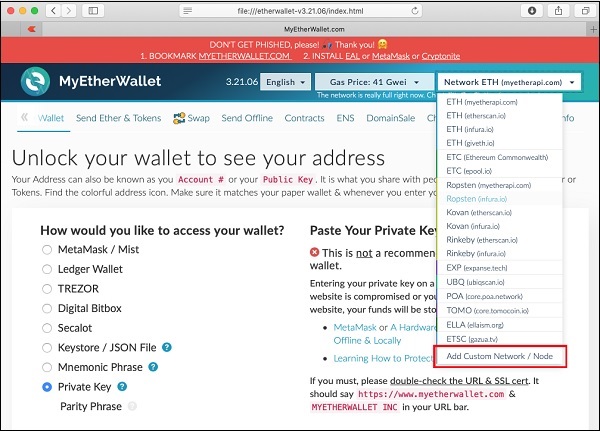
Network Dropdown

Go to the bottom of the list. You will see an option for “Add Custom Network / Node”. Select this item.

Now, a screen will appear asking for the Ganache server address and the port to which it is listening.
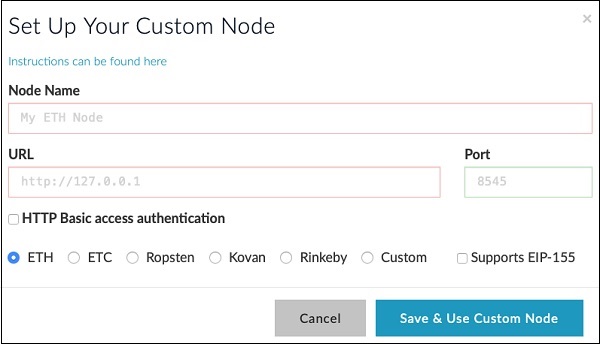
Add Custom Network

Type your Ganache server details – http://127.0.0.1 and Port: 8545. These would be the values set by you in the Ganache server setup. Give a name of your choice to this node. Click on the “Save & Use Custom Node” button. You will see the connected message at the bottom of the screen. At this point, your wallet is successfully connected to the Ganache Blockchain.

You are now ready to deploy the contract on this connected Blockchain.

Similar Posts

  • Smart Contracts

    There are several tools available to develop and test contracts. One of the simplest tools is provided on the official Ethereum site itself. The tool is called Remix, we will use this for our contract development. Remix for Contract Development Open the Remix IDE by typing in the following URL in your browser.https://remix.ethereum.org The following screen…

  • Creating Contract Users

    In this chapter, we will learn the creation of contract users on Ethereum. To create a user for our published contract, we will create another MyEtherWallet client attached to the same Ganache Blockchain that you have been using in the previous steps. Go to the MyEtherWallet screen and create a new wallet. Click on the contracts menu and select the “Interact with…

  • Deploying Contract

    To deploy the contract, select the Contracts menu option as shown in the screenshot below − You will need to enter the contract’s bytecode on this screen. Remember, when you compile your Solidity contract code, it generated a bytecode that runs on EVM. You will now need to obtain this bytecode from Remix IDE. Go to the Remix…